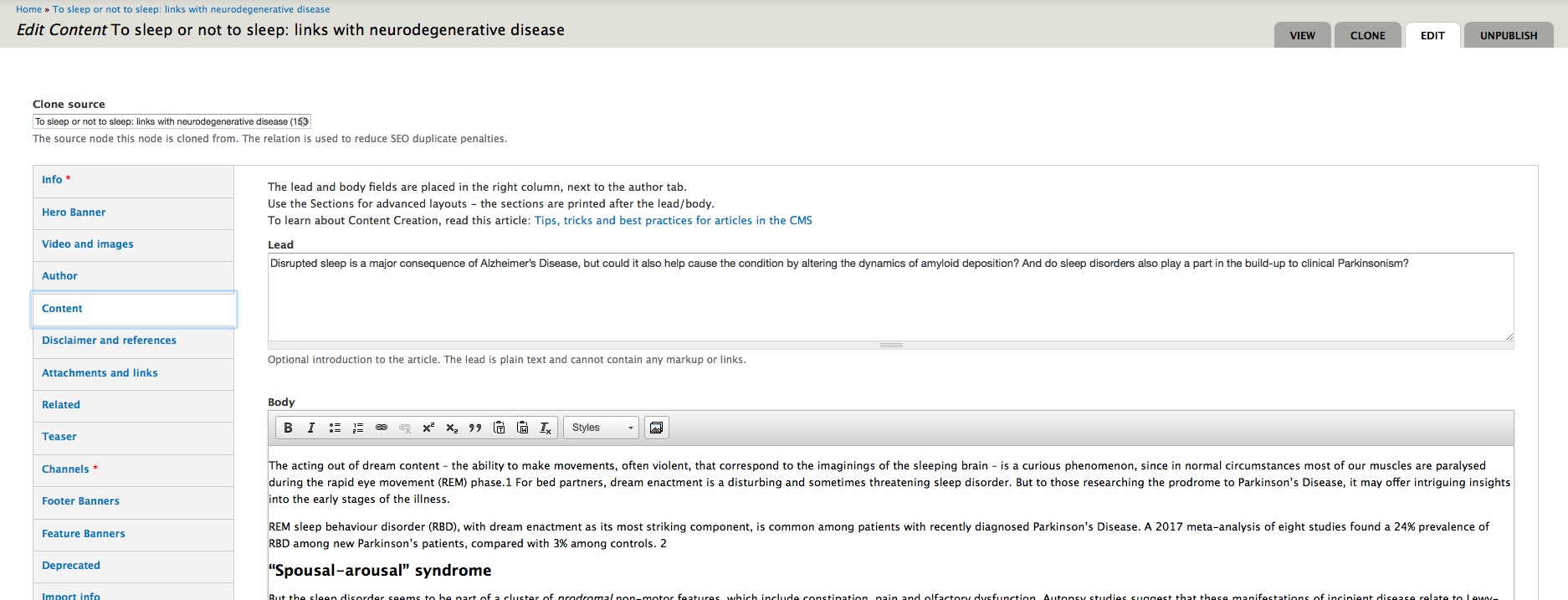
This is an introduction to how you can get started with your localized version of Progress in Mind
Progress in Mind is served globally as an open content and resource platform.
Local markets or regions may launch a localized Progress in Mind hub to
- comply with local legislations
- serve local content
- serve selected global content
- translate all or parts of the platform and global content
- have an individual database of signups and other custom webforms
- integrate with own CRM, local validation services and other third party platforms.
- develop or embed custom modules
Domains and local redirection
When a local version is created, trafic to the global platform progress.im will be redirected to the local platform local.progress.im based on IP adress of the visitor. For instance visitors with an IP adress registered in Brazil will be redirected to brazil.progress.im
[[{"fid":"2965","view_mode":"teaser_large","fields":{"format":"teaser_large","field_file_image_alt_text[und][0][value]":"Local redirection","field_file_image_title_text[und][0][value]":"Local redirection"},"type":"media","link_text":null,"attributes":{"alt":"Local redirection","title":"Local redirection","height":277,"width":687,"class":"media-element file-teaser-large"}}]]
HCP Verification
Localized hubs may choose from different access models:
- Open access
- HCP verification required
- HCP verification and validation required
The open access model will serve the website content to all visitors. Optional signup to the local newsletter can be available as menu items and promoted with banners and other CTA elements throughout the website.
This model will maximize the exposure of the content, but may have lower newsletter signups and logins since it is not a strict requirement of the visitor.
If local legislation allows for open access, this model is the recommended localization. Increasing the number of visitors and monthly returning visitors is expected to surpass other models also in terms of signups on the long run.
HCP verification model requires the visitor to register or login to access the website content. This can be a nescessary model if legislation demands that pharma content is gated.
The benefit of the HCP verification is that almost only HCPs are expected to visit the website, and emails and preferences are gathered prior to the visit of all visitors.
The backside is that many visitors refuse to signup prior to seeing any content and may leave the website for good. Rejecting a visitor at the front door is an expensive action.
[[{"fid":"2966","view_mode":"teaser_large","fields":{"format":"teaser_large","field_file_image_alt_text[und][0][value]":"HCP verification","field_file_image_title_text[und][0][value]":"HCP verification"},"type":"media","link_text":null,"attributes":{"alt":"HCP verification","title":"HCP verification","height":383,"width":728,"class":"media-element file-teaser-large"}}]]
Once a visitor has completed the registration, future access is easier by just logging in with email and password.
HCP verification and validation model takes the visitor either to a third party validation service or implements a validation step after a registration form has been submitted.
This model ensures that any visitor is actually a validated HCP but on the other hand many visitors will refuse to submit to a complicated procedure to get access to a content platform.
[[{"fid":"2967","view_mode":"teaser_large","fields":{"format":"teaser_large","field_file_image_alt_text[und][0][value]":"HCP verification and validation","field_file_image_title_text[und][0][value]":"HCP verification and validation"},"type":"media","link_text":null,"attributes":{"alt":"HCP verification and validation","title":"HCP verification and validation","height":380,"width":720,"class":"media-element file-teaser-large"}}]]
Gated and open content
In order to give visitors easy access and also gate legally required information, a hybrid model can be used in some cases.
For instance if interviews and general articles are allowed to be public available, but certain articles mentioning treatment, product names or other specifics has to be gated, a hybrid model can serve this:
[[{"fid":"2968","view_mode":"teaser_large","fields":{"format":"teaser_large","field_file_image_alt_text[und][0][value]":"Hybrid model","field_file_image_title_text[und][0][value]":"Hybrid model"},"type":"media","link_text":null,"attributes":{"alt":"Hybrid model","title":"Hybrid model","height":249,"width":402,"class":"media-element file-teaser-large"}}]]
This will present the website and a lot of content before the visitor is required to HCP verify or validate.
CRM integration
When a visitor complete the verification step they will be logged in, and the remaining visit can be tracked for that visitor.
Both the registration data, any other webform submission and engagement in the website such as page views, viewed videos etc. can optionally be integrated with a CRM:
[[{"fid":"2969","view_mode":"content_full","fields":{"format":"content_full","field_file_image_alt_text[und][0][value]":"CRM integration","field_file_image_title_text[und][0][value]":"CRM integration"},"type":"media","link_text":null,"attributes":{"alt":"CRM integration","title":"CRM integration","height":377,"width":543,"class":"media-element file-content-full"}}]]
The data can be queued for manual or thid party screening before sending it into a CRM, and it can be partly anonymized. For instance instead of providing a log of timestamps and page views, an overall count of categorized pages can be aggregated. Examples of HCP data integrated with a CRM or accessible to admins of the local platform:
- HCP name
- HCP VAT number
- HCP profession
- HCP adress
- etc.
- Number of logins
- Number of newsletters recieved
- Number of newsletters opened
- Number of articles tagged depression read
- Number of articles tagged schizophrenia read
- etc.

When you're a hub editor, you'll find a Global content tab at the top of the landingpage under the local menu. See the screenshot above.
The Global content tab leads you to an overview of all the content available to you from the global site. Choose the content you want and hit the clone button to the right as you can see below.
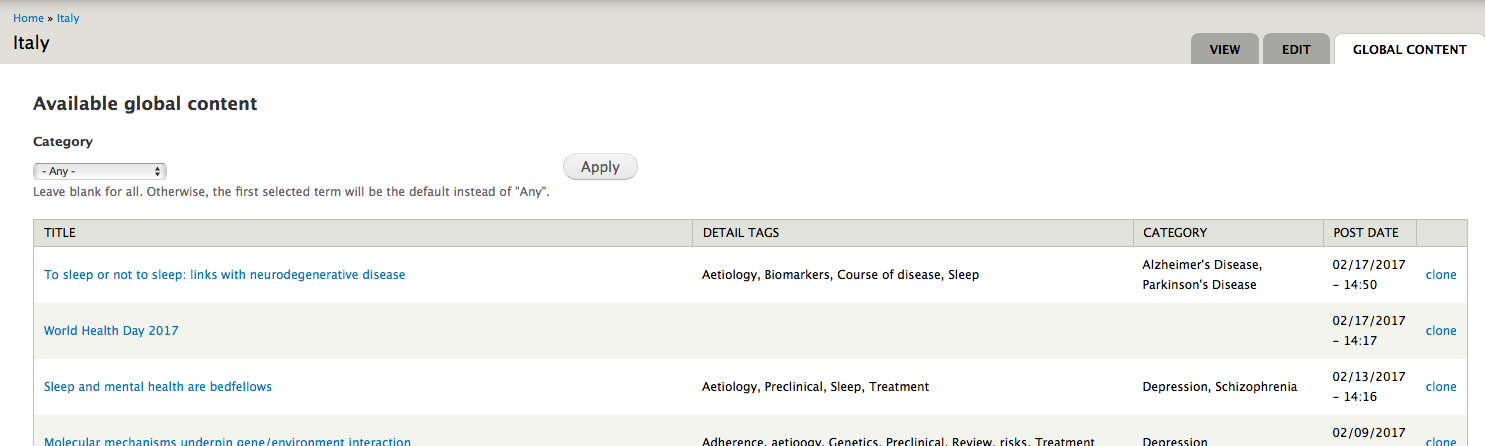
You will be asked where the content should be cloned to. Select the hub you are hub editor of.

Then the articles is cloned to your hub and you have en exact copy of the content you can translate into the wished language.